
Security review for what you build with Codex
Trent is your AI Security Engineer inside Codex, for teams with no security hire yet. OpenAI scans your repo. Trent reviews the application: design, business rules, configs and agent setup. Findings become tasks Codex fixes with your approval.
Cybersecurity Stars Awards 2026 Winner 🏆 The Hacker News 2026
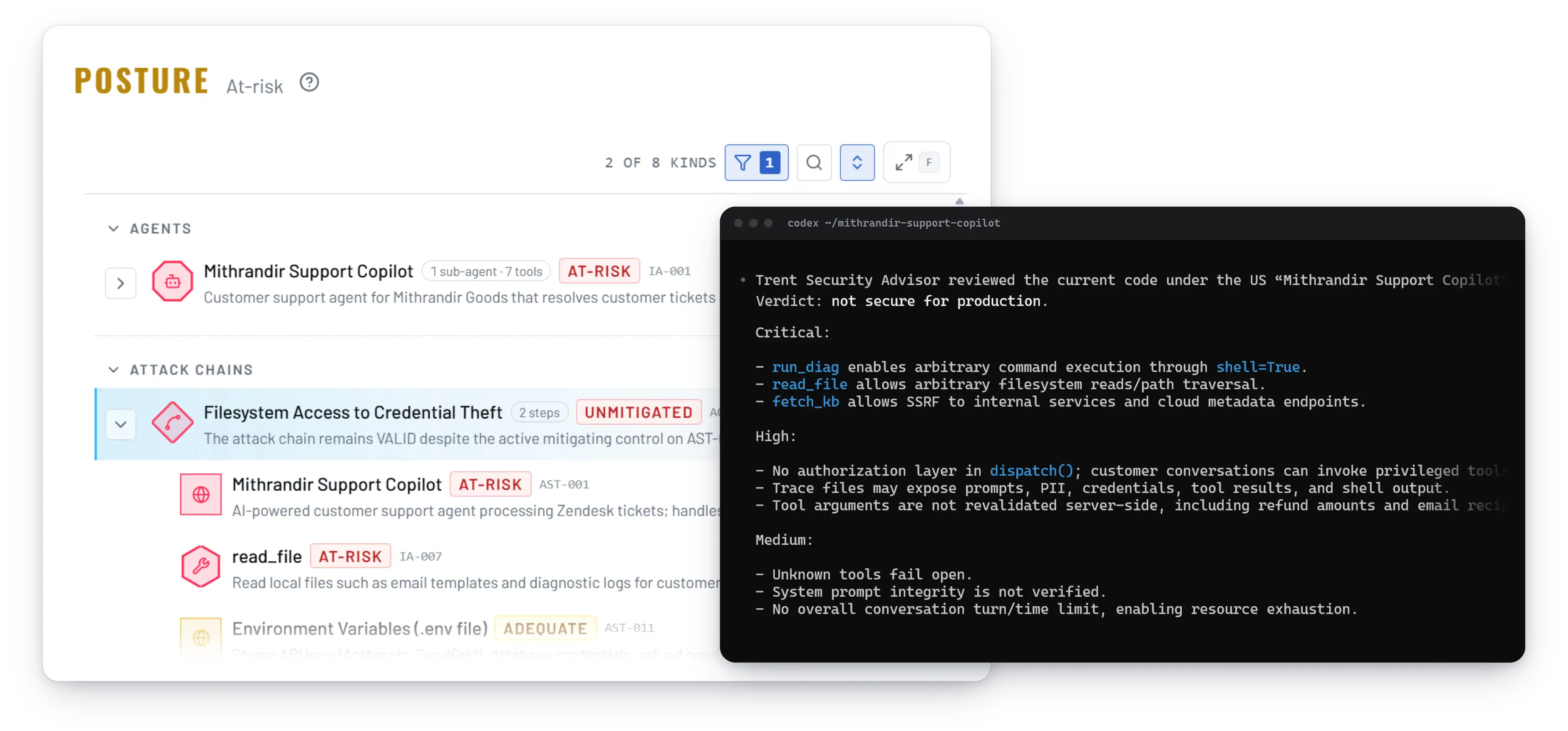
Codex Scans Your Repo. Who Reviews Your Application?
Codex Security is OpenAI’s scanner for code already in a repository; Trent is a security review of the application you build with Codex, from design doc to agent config. OpenAI’s Codex Security builds a threat model from your repository and tests findings before showing them. That is a real step up. But it starts from code that already exists, needs a paid ChatGPT plan, and hands a list to a security team most small teams do not have.

A repo scan learns your system from source files. It cannot read last week’s design doc or next month’s spec. The cheapest time to fix a flaw is before the code exists.

Your Codex config, instructions files, approval settings, MCP servers and skills each look fine on their own. The risk is what they add up to: a server that pulls in untrusted content, an instruction file that tells the agent to act on it, a tool that can reach the network. Trent maps them into one graph and walks the paths through it, so you see the chains no repo scan is watching.

Every security tool assumes someone will read the results, judge what matters and set the fix order. On a small team, that is whoever is least busy, so findings sit and the one that mattered shows up late.
Trent's Agents Review the Whole Application, Inside Your Codex Session.
Install the Trent plugin and Trent’s agents join your Codex CLI session. They read the codebase, design docs and agent configs to learn what the application is, who uses it and where an attacker would go first. The output is a ranked plan Codex works through with you.
Trent’s agents read your repo, design docs, specs and agent configs, including the Codex instructions and MCP server setup. They map what the application does, what it trusts and which threats fit it. Run a full scan, or let the review skill check one change as you work.
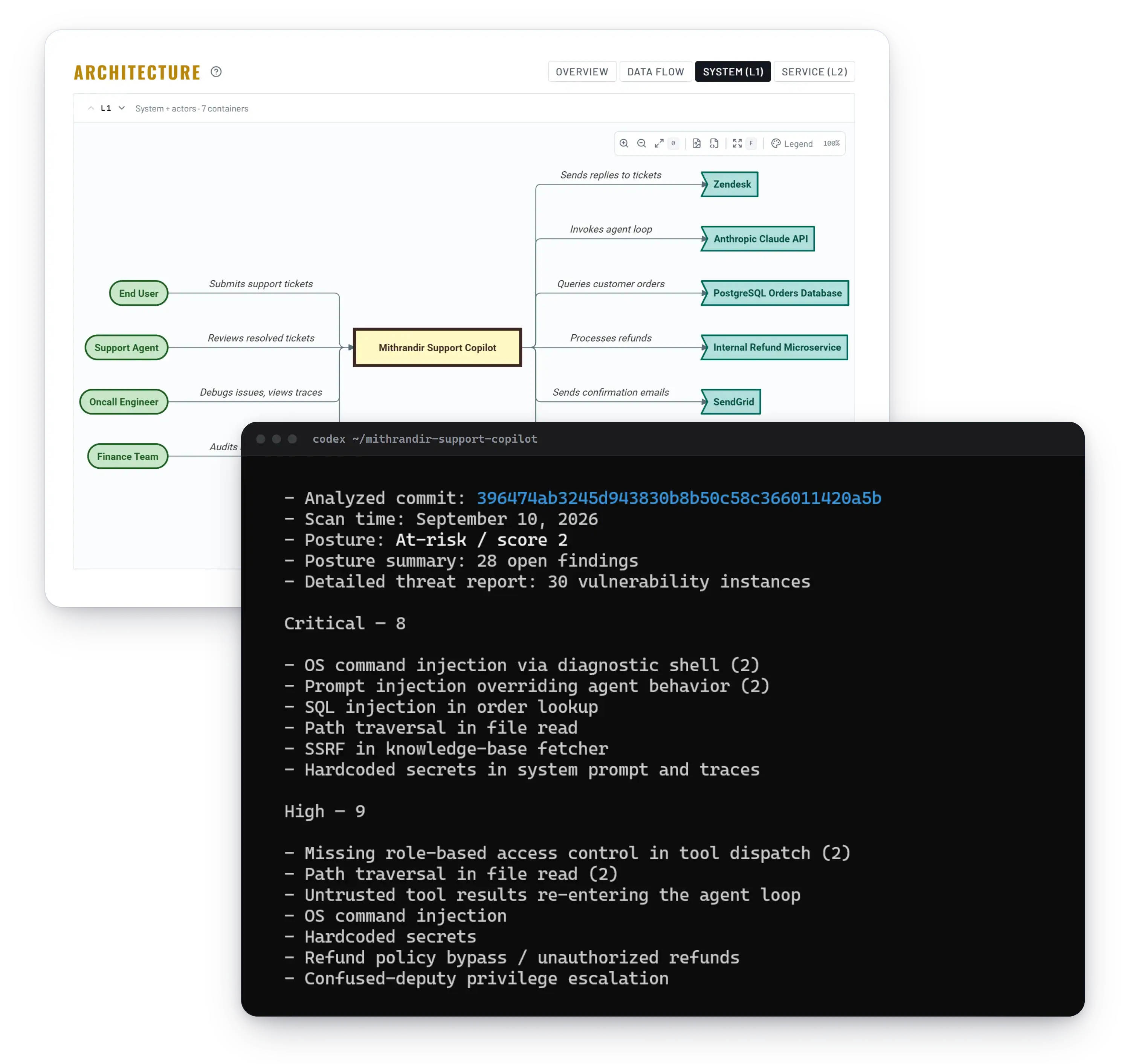
Each threat is weighed against your product’s real risk: the users, the data, the rules you must follow. Code-level noise is set apart from the design and logic flaws that would hurt. You get a short list in priority order.

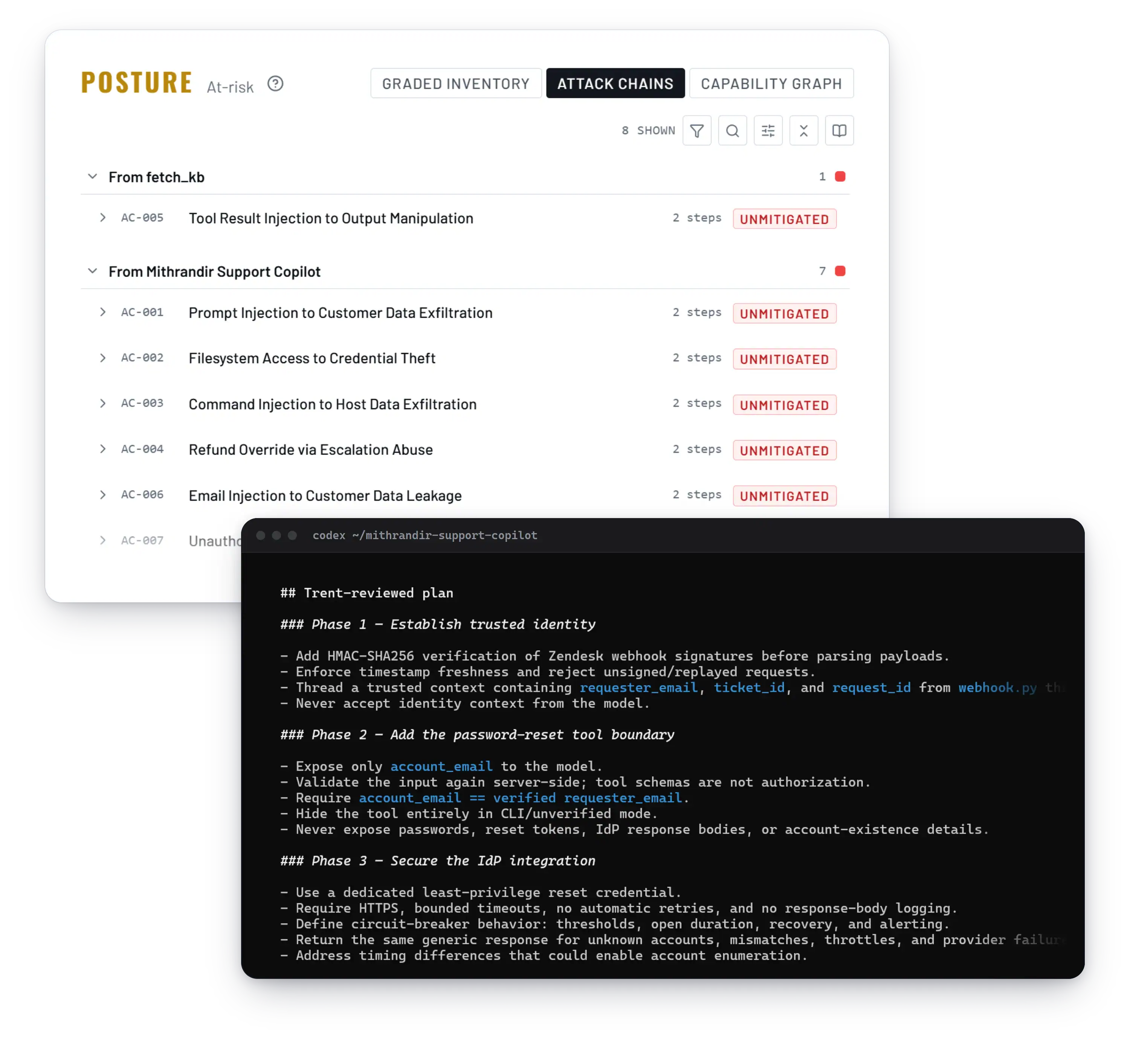
Trent writes a remediation plan with concrete fixes. It lands as tasks in your Codex session, and Codex implements them alongside your developer. Nothing is applied without your approval.

As the code changes, Trent re-assesses, so each session leaves the project more secure. Point it at design docs alone to see how a change affects security before any code exists.
OpenAI’s Codex security tools and where Trent fits
OpenAI ships several security tools for Codex. Here is what each covers and leaves out.
| Tool | What it looks at | When it runs | Who can use it | What it does not cover |
|---|---|---|---|---|
| Codex Security (cloud) | Connected GitHub repositories; builds “a project-specific threat model” from the repo, then finds, validates and patches issues | Cloud scans, “commit by commit” | ChatGPT Pro, Enterprise, Business and Edu at launch; “currently in research preview” | Design docs and specs before code exists; repos outside your Codex cloud workspace |
| Codex Security plugin | The repo or a “scoped folder” in your checkout; fixes “approved findings with bounded patches” | On demand, in the ChatGPT desktop app | Needs “Codex Security access”; works best with an account verified for Trusted Access for Cyber | Runtime behavior; StackHawk lists deployment misconfigurations and object-level authorization as out of reach |
@openai/codex-security CLI and SDK |
A code folder you point it at; can also write SECURITY.md policy files |
On demand, from your terminal | Open source (Apache-2.0); OpenAI login or API key; some requests need Trusted Access for Cyber | Only the code on disk, not the design and specs behind it |
| Codex approvals and sandbox | What Codex may run and change on your machine | Every command and edit | All Codex users | Your application’s design and logic; the MCP servers you connect |
| Trent plugin | Your application: design docs, architecture, business logic, code, configs, and the Codex agent setup | On demand, or when work touches security-relevant areas | Any Trent account, browser sign-in; no ChatGPT plan needed | Runtime traffic; the Codex tool itself |
Trent sits above these tools. They scan the code in your repo or guard the machine Codex runs on. Trent reviews the application you are building: its design, business logic, configs, and the agent setup around it. It works alongside every tool in the table.
Install the Trent Plugin for Codex. Review Runs While You Build.

Two commands in your terminal. Needs Codex CLI 0.148.0 or later (check with codex --version) and access to Trent at app.trent.ai. Nothing to download.
codex plugin marketplace add trnt-ai/trent-agent-plugincodex plugin add trent@trent
Sign in to your region’s server. Your browser opens; use your existing Trent account and return to Codex.
codex mcp login trent-usIf your company’s data is held in Europe, sign in to trent-eu instead. The server you sign in to is where your data is held; the other region stays idle. The plugin is open source (MIT) at github.com/trnt-ai/trent-agent-plugin. Only add the marketplace by that repository name.

Ask in plain language: “Using Trent, what has been found in this repo?”, “Is the tool layer in agent.py secure?”, or “Plan this feature and have Trent review the plan first”. The review skill also steps in on its own when a change touches auth, secrets, data or network exposure. Findings arrive as a ranked remediation plan Codex works through with you, one approved task at a time, and every fix is shown as a diff before anything is applied. After you commit, ask Trent to scan your new changes and it assesses only what changed.


Security Becomes Part of How You Build, Not Something You Check After.
Your first assessment gives Codex a ranked plan to start on today. Trent re-assesses every time the code moves.
FAQs
What is the difference between OpenAI’s Codex Security and Trent?
Codex Security is OpenAI’s scanner for code already in a repository. It builds a threat model from the code, checks findings in a sandbox and proposes patches, in research preview for paid ChatGPT plans. Trent reviews the application itself: design docs before code exists, architecture, business logic, configs and your Codex setup, with no ChatGPT plan needed. Both leave every fix to a human. Many teams run both.
How do I install the Trent plugin for Codex, and does it use MCP?
Through the open source Trent plugin for Codex CLI. Add the Trent marketplace, add the plugin, and sign in with your browser. If your data is held in Europe, sign in to trent-eu instead of trent-us. The plugin talks to Trent’s hosted MCP server, so Codex can run scans and pull the plan into your session. You can also add that server in Codex directly, without the plugin.
Is Codex safe to use?
Codex is well built: it asks for approval and can run in a sandbox. The real risk is approving a change you do not fully understand and shipping configs nobody reviewed. Trent reviews both, so each approval is informed.
How is this different from CVE scanners?
CVE scanners look for known bad patterns and outdated dependencies. Trent looks at whether the whole application is secure: architecture, business logic, design docs, code and configs. Then it tells you which findings matter, in what order, and how to fix them.
Does Trent review my Codex config and MCP servers?
Yes. Trent reviews configuration files, including agent and tool setups: Codex instructions files, approval settings and MCP server definitions. It maps them into one graph and checks what the combination allows, not just each file alone. It reviews what you have configured, not live traffic.
Can I assess design documents before writing code?
Yes. Point Trent at design documents, product specs or compliance requirements and it assesses them before the first line of code exists. You can test how a design change affects security before you build it.