
12 Best Threat Modeling Tools in 2026 (Free, Open Source and AI-Native)


The best threat modeling tool is the one your team will keep current. For a free start, use OWASP Threat Dragon on any operating system or the Microsoft Threat Modeling Tool on Windows. For models kept in code, use pytm or Threagile. For programs across many teams, use IriusRisk, ThreatModeler or SD Elements. To skip describing your system a second time, have an AI tool draft the model from your code.
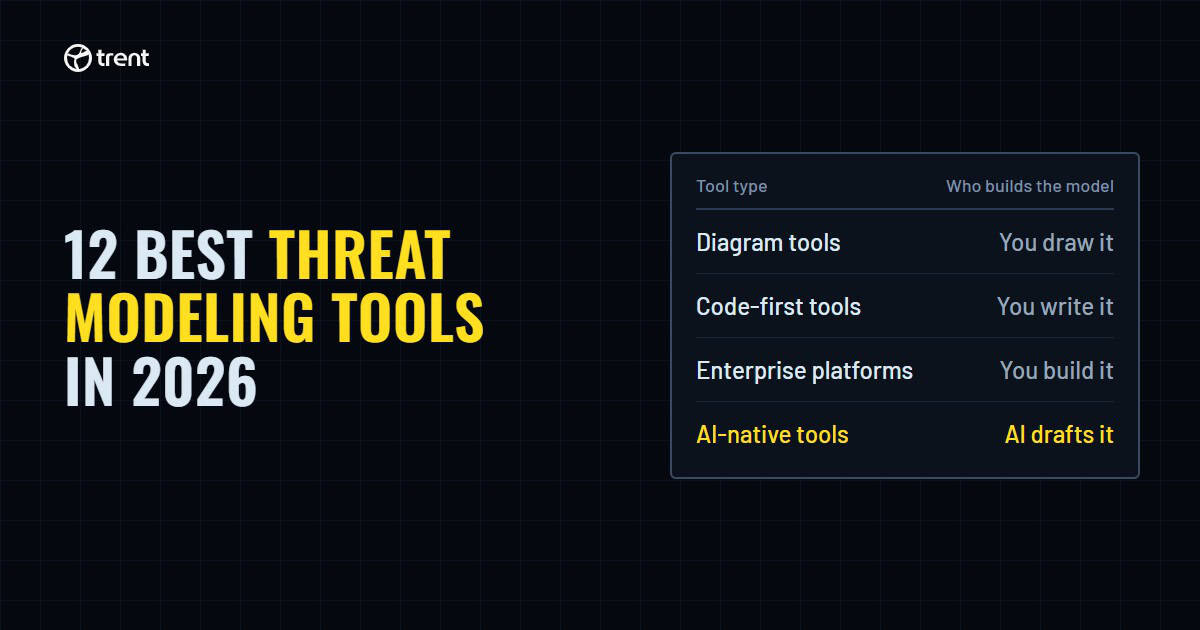
Five of the tools below are free and open source, and two more have a free plan. The rest are paid platforms with pricing on request. They fall into four groups. Free diagram tools (Microsoft Threat Modeling Tool, OWASP Threat Dragon) are good for learning. Code-first tools (pytm, Threagile, AWS Threat Composer) keep the model in your repo. Enterprise platforms (IriusRisk, ThreatModeler, SD Elements) run it as a program. All three need designers and developers to describe the system by hand, which comes close to building it twice. AI-native tools build the model for you from code or design docs, and your team reviews the draft.
Below are 12 tools across those four groups, with what each one costs, how it works, what it runs on and when it last shipped a release. Every fact was checked against the vendor’s site or GitHub repo in November 2026. One disclosure up front: Trent is our product, and it sits in the AI-native group. We kept its entry to the same format as everyone else’s.
New to the practice? Start with what threat modeling is, then come back here to pick a tool.
The 12 tools at a glance
Cost and effort
| Tool | Type | Effort | Price | Open source |
|---|---|---|---|---|
| Microsoft Threat Modeling Tool | Diagram | High: you draw and redraw every diagram | Free | No |
| OWASP Threat Dragon | Diagram | High: you draw and redraw every diagram | Free, open source | Yes |
| OWASP pytm | Code (Python) | High: you write and update the model in Python | Free, open source | Yes |
| Threagile | Code (YAML) | High: you write and update the model in YAML | Free, open source (MIT) | Yes |
| AWS Threat Composer | Threat statements + diagrams | High: you write each threat statement (AI starter is experimental) | Free, open source (Apache 2.0) | Yes |
| IriusRisk | Enterprise platform | Medium: you build the diagram, rules add threats | Free Community Edition (3 models); paid on request | No |
| ThreatModeler | Enterprise platform | Medium: AI drafts the model, your team tunes each one | On request | No |
| SD Elements (with Devici) | Questionnaire + diagrams | Medium: you answer a questionnaire per app | On request | No |
| STRIDE GPT | AI, open source | Low to medium: you write the description or point it at a repo | Free (you pay for the LLM) | Yes |
| Seezo | AI-native | Low: drafts from specs and tickets, you review | Free start; paid on request | No |
| Clover Security | AI-native | Low: drafts from Jira, Confluence and Slack, you review | On request | No |
| Trent AI | AI-native | Low: drafts from your code and docs, you review | Access and pricing available on request | No |
Where each tool runs
| Tool | Runs on | Methods | Last release | Best for |
|---|---|---|---|---|
| Microsoft Threat Modeling Tool | Windows desktop only | STRIDE | Nov 2025 | Learning STRIDE on Windows and Azure |
| OWASP Threat Dragon | Windows, macOS, Linux, self-hosted web | STRIDE, LINDDUN, CIA, PLOT4ai | May 2026 | Free diagramming on any OS |
| OWASP pytm | CLI, Python library | Built-in threat rules | Nov 2026 | Python teams who want the model next to the code |
| Threagile | CLI, Docker | Built-in risk rules | Jul 2024 | Models in a build pipeline, if you accept slow upkeep |
| AWS Threat Composer | Web app, VS Code extension | AWS threat grammar | Nov 2026 | Teams on AWS who want JSON models in the repo |
| IriusRisk | SaaS or on-premises | STRIDE plus compliance libraries | Hosted, ongoing | Rules-based modeling across many teams |
| ThreatModeler | SaaS | STRIDE, PASTA, MAESTRO | Hosted, ongoing | Large enterprises modeling apps and cloud together |
| SD Elements (with Devici) | SaaS or on-premises | Requirements and compliance driven | Nov 2026 | Regulated teams that need audit evidence |
| STRIDE GPT | Self-hosted web app, CLI | STRIDE | Nov 2026 | A fast free first draft |
| Seezo | SaaS | Own decision tree, STRIDE tags | Hosted, ongoing | Design reviews from specs and tickets |
| Clover Security | SaaS | Not published | Hosted, ongoing | Product security teams buried in design reviews |
| Trent AI | SaaS, plus a hosted MCP server for coding agents | Attack chains traced through real code | Hosted, ongoing | Teams shipping AI agents and AI-written code |
Four kinds of threat modeling tool
Most “best tools” lists mix whiteboards, diagram apps and full platforms in one ranking. That hides the real choice, which is how much of the work you want the tool to do. Plenty of teams still start on a whiteboard, in Miro or in draw.io, and that is a fine first step, but none of those suggest threats. Here is the ladder of real threat modeling tools, from most manual to most automated.
- Diagram tools. You draw a data flow diagram, and the tool suggests threats for each element. Great for learning, but it doubles the work. Your team builds the system once in code and again as a diagram, then redraws the diagram every time the code changes.
- Code-first tools. You describe the system in Python, YAML or JSON. The model lives in Git, so it gets reviewed like code. Someone still has to write it by hand and rewrite it when the system changes, so the work still gets done twice.
- Enterprise platforms. Rules engines, threat libraries, compliance mapping and reporting for dozens of teams. Built for running threat modeling as a program. Rules add the threats, but people still build and maintain each model.
- AI-native tools. The tool reads your code, design docs or tickets and drafts the model itself. You review and correct it instead of starting from a blank canvas.
Adam Shostack sorts tools into four groups too, by who uses them. We sort by how much of the work the tool does. Pick the group first, then the tool. A team of five shipping weekly and a bank with 300 applications rarely want the same thing. If you need a method before a tool, our STRIDE threat model guide covers the one most of these tools use.
How we picked and checked these tools
We compared every tool on the same points: how you build the model (diagram, code, questionnaire or AI), which threat library or method it uses, whether it suggests fixes, where it runs, whether it is open source, how recently it shipped a release, and whether it connects to Jira, CI/CD or coding agents. These follow the criteria in the threat modeling tools taxonomy by Shi and colleagues. Every fact was checked against the vendor site or GitHub repo in November 2026, and every tool links to its own page so you can check it yourself.
Free and open source threat modeling tools: diagram apps
1. Microsoft Threat Modeling Tool
The Microsoft Threat Modeling Tool is the classic way to learn STRIDE. You draw a data flow diagram with Microsoft’s stencils, mark trust boundaries, and the tool generates a list of threats per element with suggested mitigations. It is free but closed source, and it runs only on Windows. It is not abandoned: version 7.3.51110.1 shipped on November 10, 2025, the first release since October 2023.
How it works in practice: pick a template (SDL TM Knowledge Base for generic systems, or the Azure Threat Model Template), draw the diagram, switch to Analysis view to see the generated threats, then mark each one Not Started, Needs Investigation, Not Applicable or Mitigated. Reports, then Create Full Report, exports the result. Models save as .tm7 files and templates as .tb7; Microsoft publishes its templates on GitHub.
What trips people up: there is no Mac, Linux or online version, so Mac users need a Windows virtual machine or a cross-platform tool such as Threat Dragon. The “2016” download still shows up in search, but it is an old build; install the current version instead. And the weak spots haven’t changed: models are local files, collaboration means passing files around, and nothing updates when the system changes, so every code change means redrawing the diagram by hand.
- Price: Free
- Runs on: Windows 10 Anniversary Update or later, with .NET Framework 4.7.1 or later
- Download: aka.ms/threatmodelingtool (installs as a self-updating ClickOnce app)
- Last release: 7.3.51110.1, November 2025
- Best for: Windows and Azure teams learning STRIDE
2. OWASP Threat Dragon
OWASP Threat Dragon is the free, open source answer to Microsoft’s tool, and it runs everywhere. You get a desktop app for Windows, macOS and Linux, or a web version you can host in a container. There is also a free browser demo. It supports more methods than any other free tool here: STRIDE, LINDDUN for privacy, CIA, and PLOT4ai for AI systems. Models save as JSON, so they can live in your repo. There is no AI built in, though a separate community project adds LLM-generated STRIDE threats.
- Price: Free, open source
- Runs on: Desktop (all three OSes) or self-hosted web
- Last release: 2.6.2, May 2026
- Best for: Free diagram-based modeling on any operating system
Free and open source threat modeling tools: models as code
3. OWASP pytm
pytm lets you describe your system in Python: servers, data flows, boundaries and the data that moves between them. Run the script and it produces a data flow diagram, a sequence diagram and a threat report from its built-in threat rules. Because the model is code, it gets reviewed in pull requests and changes when the system changes, if someone updates it. The project is active, with a 1.4.1 release in November 2026.
- Price: Free, open source
- Runs on: CLI and Python library
- Last release: 1.4.1, November 2026
- Best for: Python teams that want the model versioned next to the code
4. Threagile
Threagile takes a YAML description of your architecture and runs it through built-in risk rules to produce diagrams, a risk report and a JSON output you can check in a build pipeline. The idea is still one of the cleanest takes on threat modeling as code. The catch is upkeep: the last tagged release is 0.9.1 from July 2024, and commits have slowed. Fine for a team willing to own it; risky as a long-term standard.
- Price: Free, open source (MIT)
- Runs on: CLI or Docker
- Last release: 0.9.1, July 2024 (low activity)
- Best for: Pipeline-driven modeling, if you can maintain it yourself
5. AWS Threat Composer
AWS Threat Composer, from AWS Labs, is built around “threat grammar”: a fill-in-the-blanks format for writing clear threat statements, linked to mitigations and an architecture diagram. It runs as a static web app, in VS Code or as a browser extension, and saves models as JSON. Releases ship often (1.0.93 in November 2026). AWS also offers an experimental AI command line tool and MCP server that read source code and draft a starter model using Amazon Bedrock.
- Price: Free, open source (Apache 2.0)
- Runs on: Web app, VS Code extension, browser extension
- Last release: 1.0.93, November 2026
- Best for: AWS teams that want well-written threats stored in the repo
A newer twist: threat modeling as a skill for your coding agent. Open source projects such as Grim Prompter, tachi and TMDD give Claude Code, Codex or Cursor a structured way to write and update a threat model inside the repo. They are free and young, and the output is only as good as the review that follows.
Also on many lists: CAIRIS, an open source platform that links security requirements, risks and design. It still gets commits, but its last release was in February 2023.
Threat model it before anyone writes code
Upload your design docs and Trent returns findings and security requirements before the first commit.
Request accessEnterprise threat modeling platforms
6. IriusRisk
IriusRisk is a rules-based platform: you build or import a diagram, and its engine applies threat and countermeasure libraries, including compliance standards, then pushes tasks into developer tools. Its AI assistant, Jeff, drafts diagrams from text, images or code. IriusRisk has been part of ThreatModeler since a deal that closed at the end of 2025 and was announced in January 2026. The free Community Edition allows three threat models, which is enough to try it on a real project.
- Price: Community Edition free (3 models); paid plans on request
- Runs on: SaaS (Enterprise plan can also run on-premises)
- Methods: STRIDE plus compliance libraries
- Best for: Running rules-based threat modeling across many teams
7. ThreatModeler
ThreatModeler targets large enterprises that want application and cloud threat models in one place. Its CloudModeler product builds models from cloud accounts, and its newer Nexus platform adds AI agents that draft models, plus an MCP server and CI/CD and IDE integrations. ThreatModeler bought IriusRisk (announced January 2026), and Nexus, launched in June 2026, is the platform built from both products. Pricing is on request, so plan on a sales conversation.
- Price: On request
- Runs on: SaaS
- Methods: STRIDE, PASTA and MAESTRO (for AI agents)
- Best for: Large enterprises modeling applications and cloud together
8. SD Elements (with Devici)
SD Elements, from Security Compass, starts with a questionnaire instead of a diagram. You describe your stack and the tool maps it to threats, security requirements and compliance controls, then tracks them through development. In June 2025 Security Compass bought Devici, a diagram-first threat modeling tool, which now feeds into SD Elements. It is one of the few platforms here with an on-premises option.
- Price: On request
- Runs on: SaaS or on-premises
- Methods: Requirements and compliance driven
- Best for: Regulated teams that must show auditors their secure design work
Also worth a look: Aristiun (Aribot, with published prices from a free plan to $3,000 a month) and VerSprite’s Fork (built on the PASTA method, with a free Community plan and Enterprise from $75,000 a year).
AI threat modeling tools
This is the newest group. These tools don’t wait for someone to draw a diagram. They read what already exists, such as code, design docs or tickets, and draft the threat model. Developers no longer spend hours drawing and redrawing diagrams.
AI drafts can be wrong, though. A tool can invent a threat that isn’t there or miss one that is, more so when it only has a short description to go on. People get models wrong too, and a hand-drawn diagram is often wrong because nobody updated it. Whoever made the draft, a person should review it. The open question for each one is what it reads and how well it checks its own work. For the frameworks these tools apply, see our comparison of AI threat modeling frameworks.
9. STRIDE GPT
STRIDE GPT is a free, open source app by Matt Adams. Describe your application in plain text and it uses an LLM of your choice to produce STRIDE threats, an attack tree, mitigations and test cases. You host it yourself and pay your own model costs. It is the quickest way to get a first draft, and it is under active development (0.21.0 in November 2026). Newer versions can also read a GitHub repository or a local codebase from the command line. With a plain description, the model is only as good as what you tell it.
- Price: Free, open source (MIT); you pay for LLM usage
- Runs on: Self-hosted web app or CLI
- Last release: 0.21.0, November 2026
- Best for: A fast, free first draft
10. Seezo
Seezo generates threat models and security requirements from design documents and tickets, before code exists. It works where engineers already are, with integrations for Slack and coding assistants such as Claude Code. It explains each recommendation with its own decision tree. You can start for free; paid pricing is on request.
- Price: Free start; paid on request
- Runs on: SaaS
- Input: Design docs and tickets
- Best for: Design-stage reviews from specs
11. Clover Security
Clover uses AI agents that pull context from where design work happens, such as Jira, Confluence and Slack, to run continuous threat modeling and design reviews. It also checks whether what was built drifted from what was designed. It is aimed at product security teams that can’t keep up with review requests. Pricing is on request.
- Price: On request
- Runs on: SaaS
- Input: Design tickets, docs and team chat
- Best for: Product security teams with a design review backlog
12. Trent AI
Trent is our product. It works like a security engineer on your team rather than a diagram tool. It maps what you’re running from your source code and your Markdown design docs, and it can pull in Notion pages and Linear issues as extra context. The map covers application code, infrastructure, configuration and AI agents, shown as a Capability Graph and Data Flow maps that stay current as the code changes. It drafts the security requirements your system needs, then traces attack chains through the real code to find what is actually exploitable. Trent then fixes it with your coding agents and verifies every fix, with a full audit trail. Developers can also work with Trent from inside Claude Code, Codex, Cursor, GitHub Copilot and other MCP clients through its plugin or hosted MCP server.
- Price: Access and pricing available on request
- Runs on: SaaS, plus a hosted MCP server for coding agents
- Input: Source code and Markdown design docs, with Notion and Linear as extra context
- Best for: Teams shipping AI agents and AI-written code who need a threat model that keeps up
A new category
Trent is an AI Security Engineer
Most security tools cover one layer: code, cloud, data or AI. Attackers don't stay in one layer. They chain a weak config, a vulnerable function and an over-permissioned agent into one path. An AI Security Engineer works the way a security engineer does. It reviews your code, cloud configuration and AI agents together, follows the chain between them, and hands back a fix.
Also worth a look in this group: DevArmor (AI threat models and design reviews from specs or source code, with guardrails for coding agents), AWS Threat Designer (free, open source, drafts STRIDE or MAESTRO models from architecture diagrams, version 1.0 in October 2026), Apiiro’s AI threat modeling inside its Guardian Agent (added March 2026), SecureFlag ThreatCanvas, Prime Security and Clearly AI.
Some older lists still name securiCAD, an attack simulation tool for IT networks from foreseeti. Its maker’s website was offline when we checked in November 2026, so we left it out.
How to choose a threat modeling tool
| Your situation | Start with |
|---|---|
| Learning threat modeling, on Windows | Microsoft Threat Modeling Tool |
| Learning, on macOS or Linux, or need privacy threats (LINDDUN) | OWASP Threat Dragon |
| Want the model reviewed in pull requests | pytm, Threagile or AWS Threat Composer |
| Running threat modeling across 20+ teams with compliance needs | IriusRisk, ThreatModeler or SD Elements |
| Need a free first draft today | STRIDE GPT |
| Reviews pile up at the design stage | Seezo or Clover |
| Shipping AI agents, or most code is written by coding assistants | Trent AI |
Three questions settle most choices:
- Who keeps the model current? A diagram nobody updates drifts further from the system with every change, and updating it means doing the design work twice. If no one owns upkeep, pick a tool that rebuilds the model from code or docs.
- What does it read? A drawing, a description, design docs or the code itself. The closer it reads to what actually runs, the less it has to guess.
- Does it cover AI agents? Classic tools model servers and data flows. Few model what an agent can reach, which tools it can call, or how a prompt injection chains into a data leak.
Short on time? Our 15-minute threat model gets a team started before any tool decision.
What changed in threat modeling tools in 2026
- The big two merged. ThreatModeler bought IriusRisk in a deal announced in January 2026. Buyers who compared them now face one company.
- Diagram tools got absorbed. Security Compass bought Devici in June 2025, and Devici models can now be imported into SD Elements.
- AI drafting is now standard. IriusRisk, ThreatModeler and AWS Threat Composer all added AI that drafts models. The difference is whether it drafts from a description or from the real system. A draft from a description still means someone writes the system down twice.
- Threat modeling moved into the coding assistant. Several tools now ship MCP servers, so developers get threat context in Claude Code or Cursor instead of a separate app.
- Threat modeling became an agent skill. Several open source projects shipped threat modeling as skills for coding agents, and Apiiro added AI threat modeling to its Guardian Agent. The model now gets drafted where the code gets written.
The bottom line
The right threat modeling tool is the one your team will keep current. Free diagram tools teach the practice. Code-first tools make the model reviewable. Enterprise platforms make it a program. All three ask your team to build the system twice, once in code and once in the model. AI-native tools close the gap that sinks most threat modeling efforts: the model going stale while the system keeps changing. With more code written by coding assistants and more AI agents in production, that gap grows every sprint.
Reviewed by Zack Rossman, Head of Engineering at Trent AI
No repo access? You can still review it.
Trent builds a threat model from your architecture documents, so vendor-built systems get reviewed too.
FAQ
What is a threat modeling tool?
A threat modeling tool helps you map how a system works, find where it could be attacked and decide what to fix. Most tools start from a data flow diagram and suggest threats per component. Newer AI tools build the model from code or design documents instead.
What is the best threat modeling tool?
It depends on who keeps the model current. OWASP Threat Dragon is the best free choice for most teams. pytm or AWS Threat Composer suit teams that want the model in Git. IriusRisk, ThreatModeler or SD Elements suit large programs with compliance needs. AI tools suit teams whose code changes faster than anyone can redraw a diagram.
Is the Microsoft Threat Modeling Tool free?
Yes. The Microsoft Threat Modeling Tool is free to download and use, with no paid tier. It is not open source, and it runs only on Windows. Download the current version from aka.ms/threatmodelingtool rather than the old 2016 build. Microsoft also publishes its templates on GitHub.
Is the Microsoft Threat Modeling Tool still supported?
Yes. Microsoft shipped version 7.3.51110.1 on November 10, 2025, the first release since October 2023. It is still free, still uses STRIDE, and still runs only on Windows 10 Anniversary Update or later. Download it from aka.ms/threatmodelingtool, not the old 2016 version.
Is there an online version of the Microsoft Threat Modeling Tool?
No. Microsoft only offers a Windows desktop app. If you want to model in a browser, OWASP Threat Dragon has a free demo at threatdragon.com and a web version you can host yourself. AWS Threat Composer also runs as a free static web app. Both save models as JSON files.
OWASP Threat Dragon vs Microsoft Threat Modeling Tool: which should I use?
Both are free and both use data flow diagrams with STRIDE. Pick Microsoft’s tool if you work on Windows and want its Azure templates. Pick Threat Dragon if you use macOS or Linux, want a browser version, need privacy (LINDDUN) threats, or want models saved as JSON in your repo. Threat Dragon is also open source.
Does the Microsoft Threat Modeling Tool work on Mac?
No. Microsoft supports it only on Windows, and there is no online version. On a Mac, run it in a Windows virtual machine or use a cross-platform tool such as OWASP Threat Dragon, which runs on Windows, macOS, Linux and in the browser.
What is the best free threat modeling tool?
OWASP Threat Dragon is the best free all-rounder because it runs on every major OS and supports STRIDE, LINDDUN and more. Microsoft Threat Modeling Tool is a good free option on Windows. For models as code, use pytm or AWS Threat Composer.
What are the 5 steps of threat modeling?
Most teams follow five steps: define what you’re building and what must be protected, map the system with a data flow diagram, identify threats with a method such as STRIDE, decide how to fix or accept each threat, and check that the fixes work. Then repeat whenever the system changes. Threat modeling tools mostly help with steps two and three.
Are there good threat modeling tools on GitHub?
Yes. The most used open source threat modeling tools on GitHub are OWASP Threat Dragon, OWASP pytm, STRIDE GPT, AWS Threat Composer and Threagile, each with hundreds to over a thousand stars. Microsoft’s tool is not open source, but its templates are on GitHub. Check the last release date, because some projects have stalled.
Which threat modeling framework do these tools use?
Most tools use STRIDE, Microsoft’s six threat categories, applied to a data flow diagram. Some add others: OWASP Threat Dragon supports LINDDUN for privacy and PLOT4ai for AI systems, ThreatModeler supports PASTA and MAESTRO, and VerSprite’s Fork is built on PASTA. Pick the method first, then a tool that supports it.
What is automated threat modeling?
Automated threat modeling means the tool does part of the work for you. Rules-based platforms such as IriusRisk generate threats from a diagram or questionnaire. They still need someone to build the diagram or answer the questionnaire first. AI tools go further and draft the whole model from code, design docs or tickets. Either way, a person still has to review the result and decide what to fix.
Can I threat model with Claude Code or another coding agent?
Yes. Free open source skills such as Grim Prompter, tachi and TMDD let Claude Code, Codex or Cursor write and update a threat model inside your repo. Commercial tools including Trent, Seezo and ThreatModeler also work with coding agents through plugins or MCP servers. Expect a useful draft, and plan for a security engineer to review it.
Can AI do threat modeling?
AI can draft a threat model from code, design docs or a written description, which removes the blank-page problem. A security engineer still needs to review it, because an AI draft only knows what it was given and can get things wrong. Tools that read the actual code tend to miss less than tools that rely on a description. A draft built from the actual code has more to go on than one built from a short description.
Is IriusRisk part of ThreatModeler?
Yes. ThreatModeler announced its acquisition of IriusRisk on January 8, 2026. IriusRisk still runs under its own name for now, including its free Community Edition, and its customers can upgrade to ThreatModeler’s Nexus platform when they choose.