

Skip to content

AI Threat Modeling

AppSec Leads: Your Threat Model Goes Stale Every Time You Ship

AI threat modeling built from your code, re-assessed as the code changes.

Your threat model was right on the day it was signed off. Every release since has moved the system further from it. With AI threat modeling, the model comes from the code itself. Trent, your AI Security Engineer, builds it from your code, configuration and design docs, and re-assesses as the code changes. Nobody has to redo it by hand.

Built for security teams stretched thin.

Agentic AI Security Platform Leader, 2026 Cybersecurity Stars Awards

By submitting this form, you request access to Trent AI. We may contact you about your request, access status, and onboarding. You also confirm that you’ve reviewed our Privacy Policy and understand how your personal data will be used.

What a Stale Threat Model Costs You

Most threat models get written once, for a design review, and then filed. The code keeps moving.

  • The Map Shows Last Quarter’s System

    A threat model is right only for the design it describes. Then the team adds an endpoint, a queue, an agent with a few tools. The document stays the same, so design reviews check a system you no longer run.

  • Too Few People to Redo Them

    Security engineers are far outnumbered by developers, and hiring will not close that gap. Nobody has time to rebuild a threat model for every system after every release. The update waits for a quiet week that never comes.

  • The New Risk Is Not on the Map

    Design reviews and customer security reviews still point to the old model. The risk the last release added is not on it, so nobody goes looking. It stays hidden until someone outside finds it.

What an AI Threat Model Should Cover

AI threat modeling keeps the usual questions (what are we building, what can go wrong) and adds the parts of a system that use AI. A useful model covers at least these threats.

  1. Prompt injection. Hidden instructions in a ticket, web page or file that steer the model or agent.
  2. Tool misuse and too much access. An agent that can call tools it does not need, or with more rights than its job needs.
  3. Data leaving through an agent. An agent that reads private data, acts on untrusted input and can send data out.
  4. Trusting model output. Code or systems that run or store what a model returns without checking it.
  5. Poisoned data or memory. Bad records in training data, a knowledge base or an agent’s memory that change later answers.
  6. New parts after each release. Every new agent, tool, skill or MCP server is a new way in, so the model has to change with the code.

AI Threat Modeling, With and Without Trent

Same goal: a map of how your system could be attacked. The upkeep is what changes.

Without Trent

  • The model starts from a diagram someone drew from memory
  • It gets updated when someone finds a free week
  • Agents, tools and MCP servers are often missing
  • The output is a long list of possible threats
  • Old threat models and design docs sit in a folder
  • Corrections live in one person’s head

With Trent

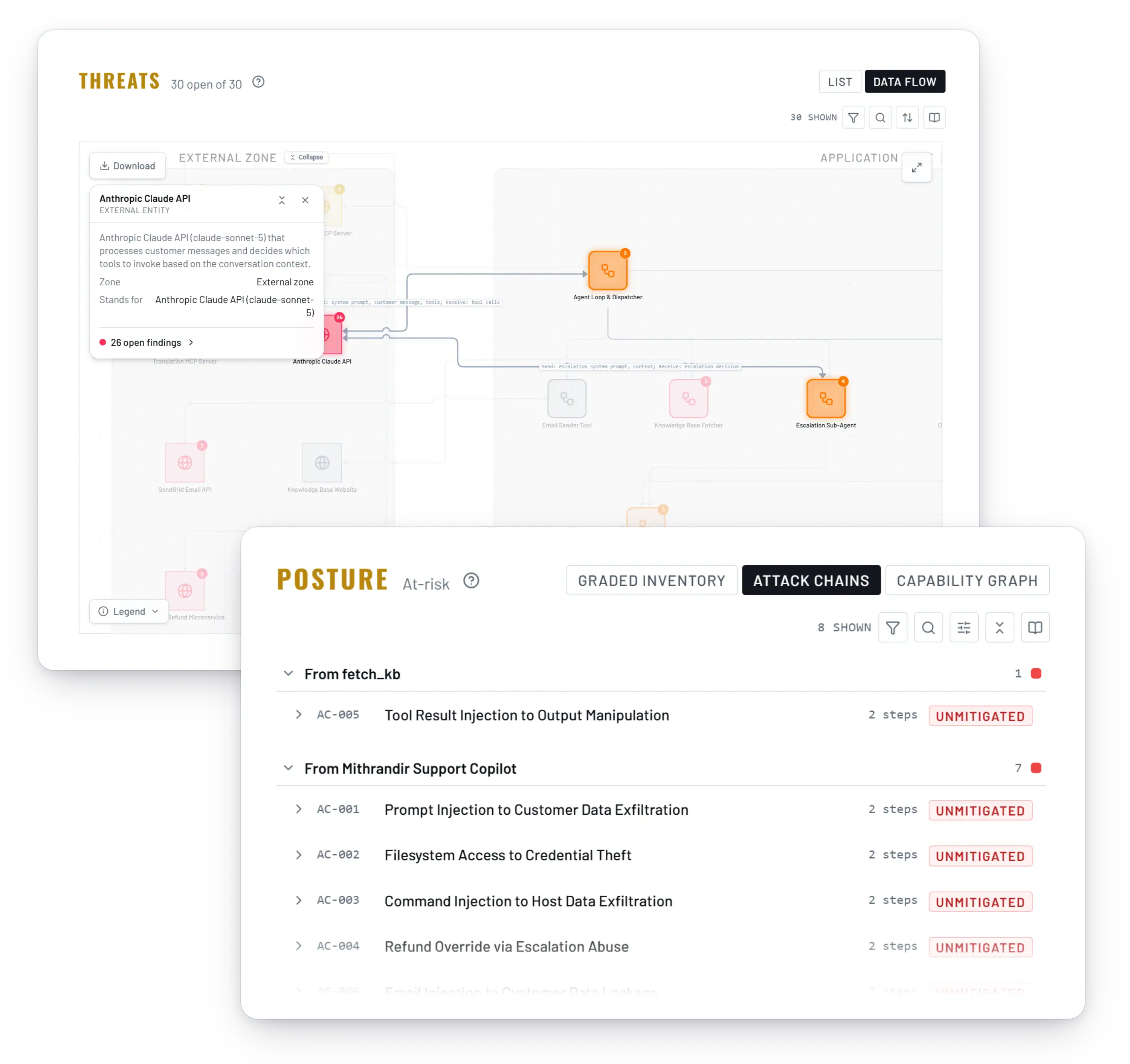
  • The architecture rebuilt from your code and configuration, with data flow maps
  • Trent re-assesses as the code changes
  • Agents, tools, skills and MCP servers mapped, with what each can read, write, execute or send out
  • Attack chains ranked by risk to your business, each with its evidence
  • Old threat models and docs read as context, next to the code
  • Every correction you make carries forward

How Trent Works

Understand. Plan. Secure.

Trent learns the system, decides what to look for, then helps fix what matters. For threat modeling, the point is that it does this again each time the system moves.

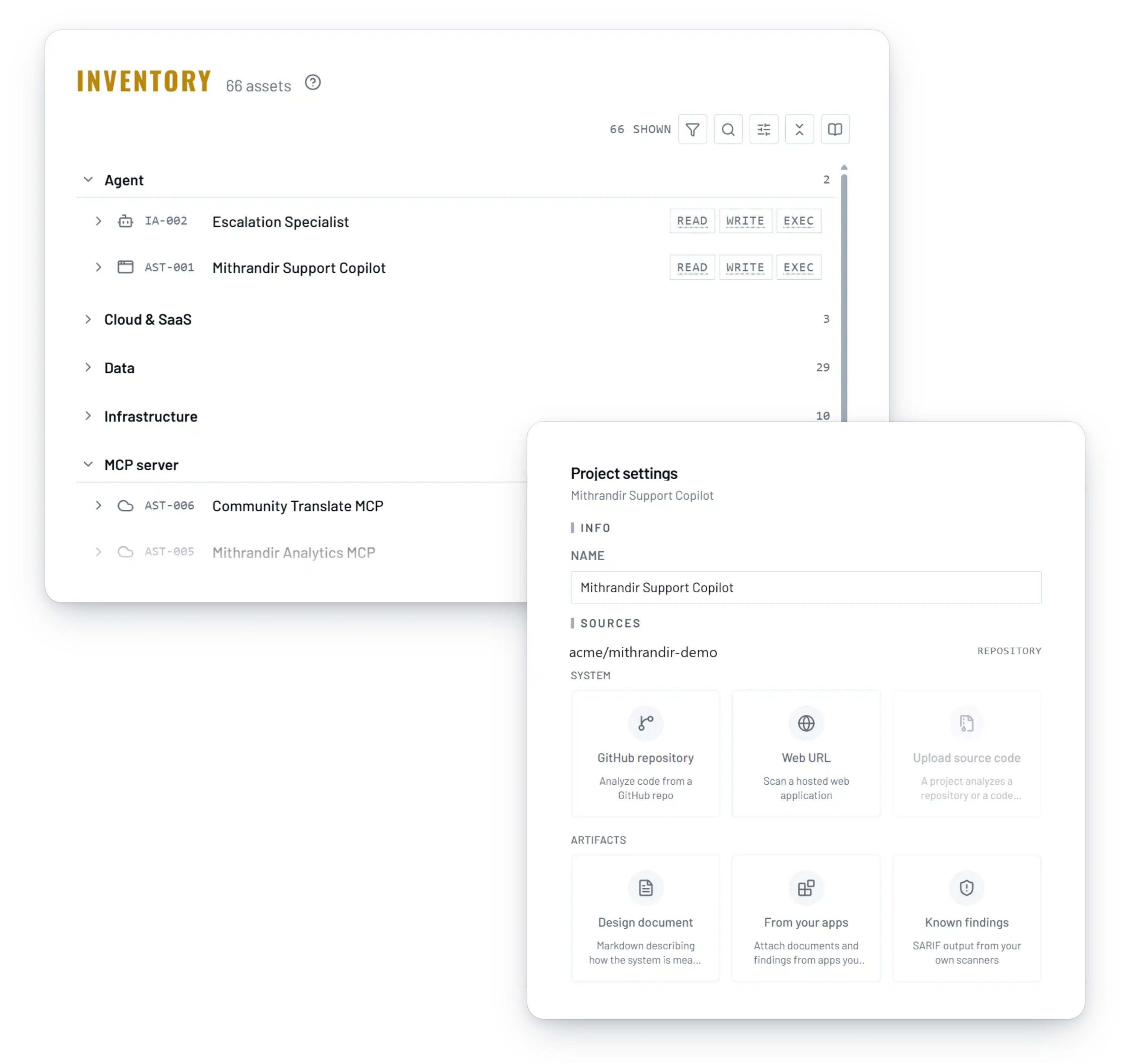
  1. Trent reads your code and configuration and rebuilds the architecture, with data flow maps. It lists the agents, tools, skills and MCP servers it finds and what each can read, write, execute or send out. It also reads the context you already have: design docs, existing threat models, pentest reports and findings from your security tools.

    Trent inventory of agents and MCP servers with what each can do, and the sources you can add: GitHub repository, web URL, design document and known findings from security tool

Built for the People Who Own the Threat Model

AppSec leads

You cover more systems than you have people for. Trent builds the model for each one and keeps it current, so your review time goes to the systems that changed.

Engineering leads

You own the threat model for what your team ships, and you write it between features. Trent builds it from the code itself, so design reviews start from the system you run today. New to the practice? Start with threat modeling for developers.

Related problems: AI-written code nobody has time to review, findings piling up, the agents your team ships, a stretched security team.

Why Trent

Trent was built for agents from the start. It reads what you build, shows the evidence behind every finding, takes correction, and fixes what it finds with your coding agents. Your code and context never leave your boundary.

Agentic AI Security Platform Leader, 2026 Cybersecurity Stars Awards

See a Current Threat Model of Your Own System

Connect a repository and add your design docs. No code yet? Start with the design doc. Access and pricing available on request.

AI Threat Modeling FAQ

What is AI threat modeling?

AI threat modeling means two things: using AI to build and update the threat model, and threat modeling systems that contain AI agents. Trent does both. It builds the model from your code, configuration and design docs, and includes the agents, tools, skills and MCP servers it finds.

What are the steps of threat modeling?

Most methods answer four questions. What are we building? What can go wrong? What are we going to do about it? Did we do a good enough job? A method such as the STRIDE threat model gives structure to the second question. The steps only protect you if you run them again when the system changes.

How often should you update a threat model?

Update it whenever the design changes in a way an attacker could use: a new data store, a new outside input, a new agent or tool, a new trust boundary. For a team that ships every week, that means most weeks. That pace is why hand-built models fall behind.

What is continuous threat modeling?

Continuous threat modeling keeps the model in step with the system. Trent rebuilds the architecture from your code and configuration and re-assesses as the code changes. Past runs stay as snapshots, so the record is never rewritten and you can show a reviewer what the model said at the time.

What is automated threat modeling, and who makes the calls?

Automated threat modeling means software does the first pass: it maps the system, lists the threats and traces the attack paths. People still make the calls. Trent shows the evidence behind every finding. If it rates one wrong, rerate it and say why, and Trent applies that reasoning to every similar case from then on.

What is threat model as code?

Threat model as code means writing the threat model in files kept in the repository, so it is versioned and reviewed like the code. It is a good habit, but a person still has to edit those files each time the design changes. Trent reads the code and configuration directly, so the model starts from what you actually run.

Is Trent an AI threat modeling tool?

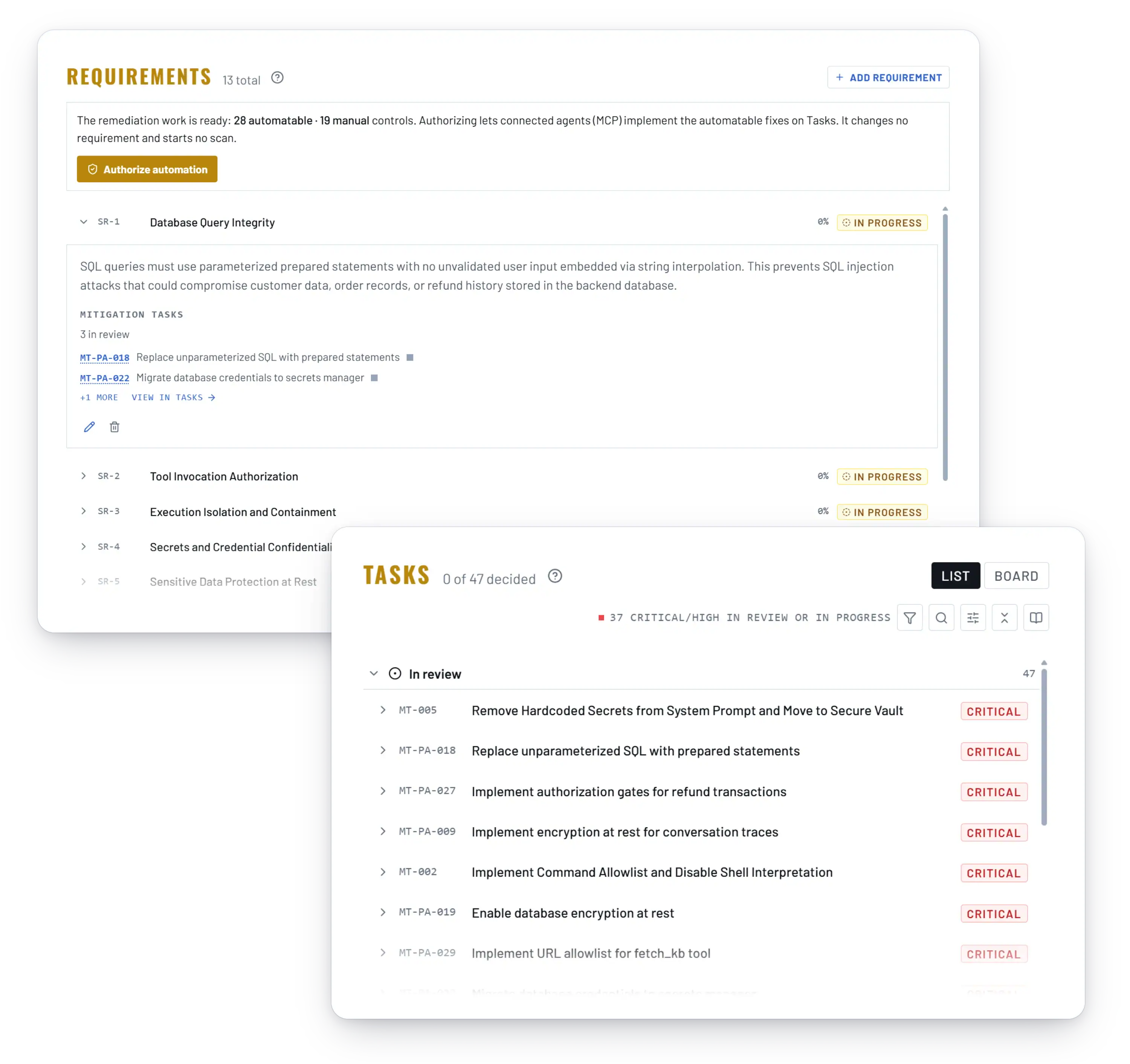
Trent produces the threat model: the architecture, data flow maps, a capability graph, security requirements, ranked attack chains and a report. As your AI Security Engineer, it also fixes what it finds with your coding agents and verifies each fix. If you want a canvas to draw diagrams by hand, compare threat modeling tools first.

Can Trent use the threat models we already have?

Yes. Add design docs, existing threat models and pentest reports, from files or from Notion, and Trent reads them as context next to your code. Findings from your security tools come in through Security connectors or SARIF, read-only, always.

Which frameworks are used for AI threat modeling?

Common starting points are STRIDE for general threats, MAESTRO for systems built from agents, MITRE ATLAS for known attacks on AI systems, and the OWASP Top 10 lists for LLM and agentic applications. Most teams combine them. Trent maps its attack chains to MITRE ATLAS. Our post on AI threat modeling frameworks compared walks through each one.