
Trent AI Provides Continuous Security Advice for Claude Code Builders

Trent’s Security Advisor for Claude Code, a security agent built specifically for providing ongoing security advice while building with Claude Code.
Many of our customers and design partners tell us that building with Claude Code is incredibly powerful. It can generate secure code, develop implementation plans, and guide you through execution. And Claude Code (and Anthropic’s latest security features like Mythos) catches low-level vulnerabilities really well, catching insecure patterns, dependency issues, and obvious misconfigurations.
But security doesn’t stop there.
Our design partners also tell us the real security gap shows up in production scenarios. Access gets “revoked” but still works through a background service. A safe-looking endpoint quietly exposes data through an indirect path. A feature passes every scan but violates a core requirement like keeping PII in the EU. None of these are obvious code-level vulnerabilities. They only appear when you understand the full system, how it behaves, and what it’s actually supposed to protect.
Security is highly contextual, often industry-specific and specialized. It depends on your architecture, your data flows, your actual vulnerabilities, and what “secure” means for your specific application. That’s especially true as you start building more complex, agentic systems. Generic best practices, static scans, and low-level fixes are just not enough.
Introducing Trent’s Security Advisor for Claude Code
This is the gap Trent is built to close. Today, we’re releasing Trent’s Security Advisor for Claude Code, a security agent built specifically for providing ongoing security advice while building with Claude Code.
- Specialized: Security-first, focused on real architectural risks
- Customized: Aligned to your application’s unique requirements
- Contextualized: Grounded in your code, design, and intent
Instead of just flagging issues, Trent builds a prioritized remediation plan that fits directly into your workflow. No dashboards. No context switching. Just security that ships with your code inside Claude Code.
Security, Built Into Your Workflow
After setup, Trent works in two modes: automatic and on demand.
Automatically, Claude Code hands implementation plans that touch authentication, secrets, data handling, network exposure or infrastructure to Trent for review before you see them. This isn’t just convenience. It gives every developer a built-in security advisor that catches hidden edge cases, race conditions, missing error handling, resource limits, and insecure assumptions that are easy to miss when moving fast.
On demand, you can bring Trent into the conversation whenever you need security judgment. Ask it to fetch your security posture, review your remediation plan, implement the next tasks, or validate fixes from an incremental scan. Because Trent understands your project context, you can move from review to remediation to validation without leaving Claude Code.
From Generic Advice to Real Security Intelligence
Most tools today focus on surface-level issues: dependency vulnerabilities, CVEs, or static checks. Useful, but they don’t answer the real question of whether your application is actually secure for what it’s supposed to do.
A static scan might flag a vulnerable dependency, but it won’t show how your system could be exploited or where it might fail due to broken assumptions. It misses things like a removed user retaining access, unexpected paths reaching internal services, or background workers processing unauthorized data.
These risks live in your architecture, not in a dependency manifest.
Trent works at this level. It understands your system, code, agents, data flows, and integrations. And produces a security plan tied to how the application actually behaves. Each goal maps to OWASP ASVS, CWE, NIST 800-53, and GDPR, without requiring manual mapping.
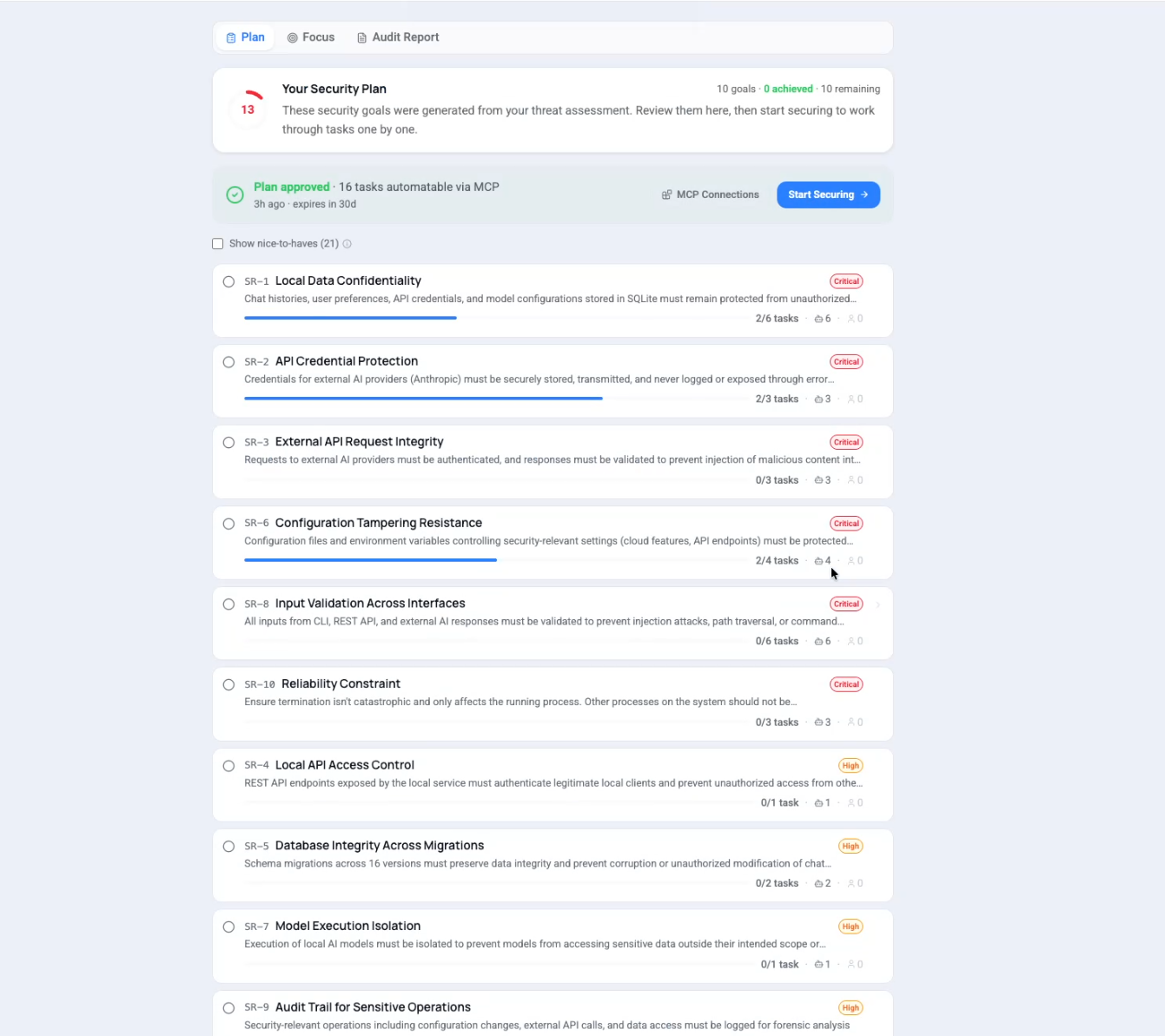
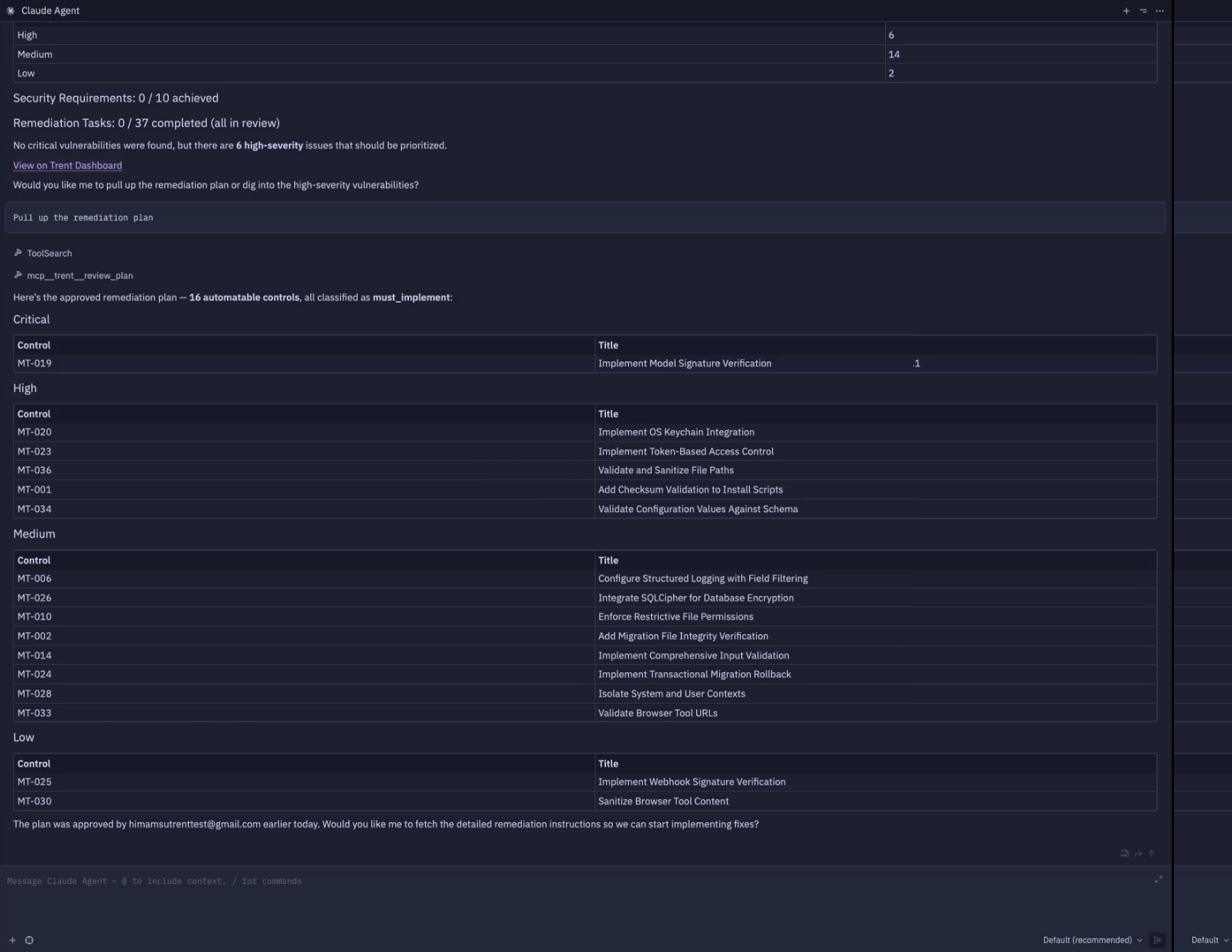
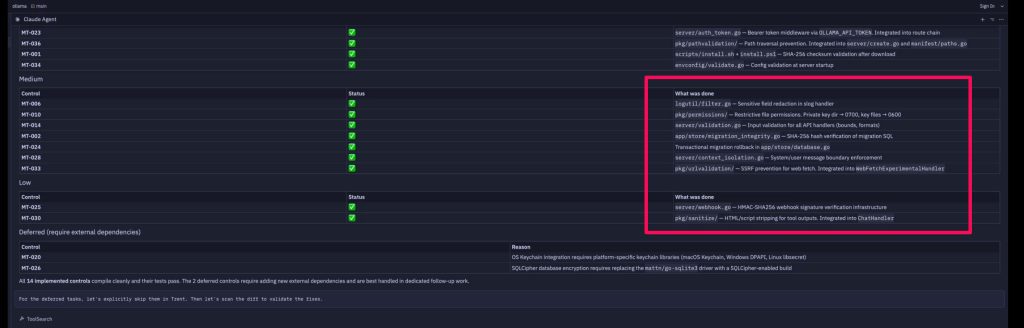
In a real Trent + Claude Code session, the plan above turns into structural controls that no pattern matcher would catch:
- Prompt injection defense via system and user message boundary enforcement (server/context_isolation.go)
- Tool output sanitization stripping HTML and script before the LLM reads it (pkg/sanitize/)
- SSRF prevention on the web-fetch tool (pkg/urlvalidation/)
- Migration SQL hash verification for schema integrity (app/store/migration_integrity.go)
Each becomes a concrete package or middleware path derived directly from the threat model.
Claude Code helps you build. Trent ensures you ship securely. Together, they close the gap between speed and security.
Built for Real Development Workflows
Trent’s Security Advisor runs alongside your workflow as a continuous, autonomous security loop. Every Claude Code session leaves your project more secure than the last.
Inside Claude Code, Trent’s Security Agents operate continuously throughout a session:
- They identify changes in code, agents, prompts, and dependencies as you build
- They prioritize what matters in your codebase and filters noise
- They propose fixes, patches, and configuration changes inline
- They show how your project’s risk changes across sessions

Get Started Today
Getting started takes under a minute and needs nothing installed on your machine.
Trent ships as a Claude Code plugin. Install it, then sign in:
claude plugin marketplace add trnt-ai/trent-agent-plugin
/plugin install trent@trent
claude mcp login trent-us
Using Codex CLI instead? Same idea:
codex plugin marketplace add trnt-ai/trent-agent-plugin
codex plugin add trent@trent
codex mcp login trent-us
The login step opens your browser. Sign in with your existing Trent account and return to your agent. There is no API key to create, copy, store, rotate or revoke, and no local package to install. After that, Trent is available in every session. You can ask it to:
- Review a plan, a diff or a config before you build it
- Scan the repository for threats and vulnerabilities and read the prioritized findings
- Work through the remediation plan with guided fixes, patches and configuration changes
- Check how your security posture has shifted since the last session
Is your company’s data held in Europe? Sign in to trent-eu instead of trent-us. The server you sign in to is where your data is held, and the other one stays idle.
Already using the old pip package? Run trent-mcp-uninstall, then pip uninstall trentai-mcp, then install the plugin as above.
The plugin is open source under the MIT licence at github.com/trnt-ai/trent-agent-plugin.
That’s it. You build with Claude Code. You secure with Trent.