MCP Security: A Threat Model for Agent Tool Access

MCP Security Stops at the Front Door
MCP security is the practice of securing the connections that let AI agents call external tools over the Model Context Protocol. It covers who may connect to a server, what each tool can reach once a call executes, where the credentials for that connection live, and how the server behaves after the version you reviewed. Connection authorization answers the first question; the other three stay open.
A lot of MCP server security guidance covers who is allowed to connect: OAuth flows, token scoping, and the sandbox the host runs the server in. That is necessary, but it is also where a lot of the practical advice stops. What the tool call does once it executes is a separate question.
Developers keep asking a version of this in public: why use MCP when an agent can call the API directly? The security answer is that MCP standardizes tool access, which is useful, and standardizes the attack path to it, which is the cost. That cost shows up one layer past the login. MCP went from spec curiosity to production dependency in under two years. IDEs and internal tools now call MCP servers to read files, hit APIs, and run code. Connection authorization tells you who can talk to a server, not what it does once it is talking, which is where the damage lands. Read MCP security as one instance of the wider agentic AI security problem: what your agent can reach matters more than what it may log into.
What a Malicious Tool Call Can Actually Do
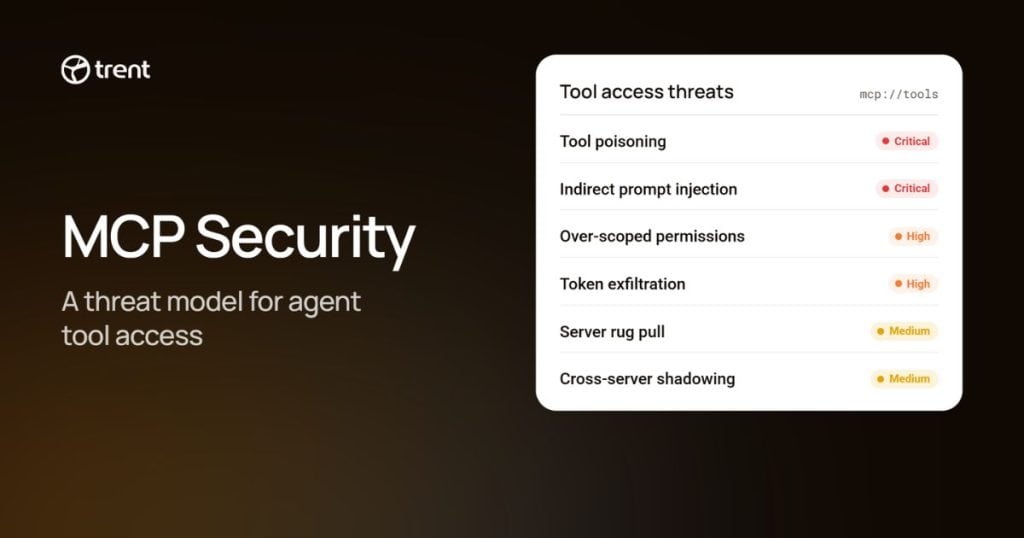
Three failure modes cover the incidents this article works through, and a login check catches none of them.
Tool poisoning and rug-pull updates. A server behaves correctly long enough to earn trust, then a later update quietly changes an existing tool definition. OWASP states the structural cause plainly on its tool poisoning page: reviewers look at tool descriptions at connect time, while tool responses enter the model context with no equivalent check. MCP can send a list_changed notification when tool definitions change, and clients such as Claude Code consume it. What no client does for you is re-review the changed definition with the same care as the first approval.
Servers that were malicious from day one. A package looks like a legitimate utility, works as one, and does its real job on the side. Tool descriptions are usually treated as trusted setup text, so a third-party description carries far more weight with the model than its author deserves.
Secrets exposure through configuration. You configure an MCP server locally, in files like .mcp.json and claude_desktop_config.json. Those files routinely hold API keys in plaintext, and they end up in public repositories.
OAuth stops none of these three, and host sandboxing contains rather than detects. It can limit what a malicious local process reaches, including one that turned malicious after review, but it will not tell you the change happened, and it does nothing for a secret in a config file. Connection auth verifies the client may talk to the server, and sandboxing limits what the host process can do. Neither inspects what the tool call itself does, and neither protects a secret sitting in a config file the host never touches.
We map the supply-chain side of those categories, server compromise, tool definition injection and resource content poisoning, in our breakdown of MCP and the agentic supply chain, along with the registry allowlisting and signature checks that establish provenance for it. Provenance is not behavior; a signed update from a compromised publisher is still signed. This article picks up where that one stops; what a call does at execution time, and how that changes with where the server runs.
Local and Remote MCP Servers Fail Differently
A local MCP server runs as a process on your own machine, under your identity, with your file access. A remote MCP server answers over the network, serves many users, and checks a credential first. They fail differently; the local one is an endpoint problem, and the remote one an identity problem.
Local. The server inherits your credentials and your file system reach. The specification’s own security guidance treats a local server as a binary that runs with the client’s privileges and tells hosts to sandbox it. Using stdio limits who can talk to the server. It does not limit what the server can do. A one-click config can run an attacker’s command on your machine, a loosely bound local listener lets another process or a web page reach it, and almost nothing outside your laptop records that the server exists. That last one has a name. Shadow MCP sits at MCP09 in OWASP’s beta MCP Top 10, covering unapproved and uninventoried servers wherever they run. An unaudited local server on a laptop is one of the usual ways one starts. The controls here sit on the host: run the spawned process in an OS-level sandbox, because a client’s own command sandbox generally does not cover the MCP servers it launches, keep local servers on stdio so only the client can talk to them, read the full untruncated command before you approve it, and check the provenance of whatever you installed.
Remote. Identity and consent become the whole game: who is calling you, what that caller may do, and what consent you actually granted. The spec’s remote risk list reads like a catalogue of delegation bugs, including confused deputy attacks against proxies with static client IDs, token passthrough where a server accepts a token nobody issued to it, and server-side request forgery through OAuth metadata discovery. The controls move up a layer: authentication as a floor rather than a feature, credentials keyed to the issuer that minted them, an egress allowlist so a poisoned tool has far fewer places to send what it steals, enforced where you control the network path, and an MCP gateway that moves policy onto the network where one team owns it. A gateway on your side cannot constrain what a vendor’s server does on its own network. So for remote servers, the questions shift to the vendor’s isolation and what your token is scoped to.
| Question | Local MCP server | Remote MCP server |
|---|---|---|
| Who runs it | You, on your own machine | A vendor or internal team, on shared infrastructure |
| Whose identity | Yours, inherited from your shell | A token or OAuth grant issued to the caller |
| Blast radius | One workstation and all it can reach | Every user the server fails to isolate |
| Where the secret lives | Plaintext in a config file on disk | Client config, or an OAuth credential in the OS keychain |
| Primary control | Sandboxing, stdio transport, provenance checks | Per-request authorization, egress allowlists, a gateway |
| Main blind spot | Little outside the machine records that it exists | A valid token is rarely re-checked for reach |

- Local servers inherit your identity and stay invisible to everyone else. Remote servers put an identity check at the front and a shared blast radius behind it.
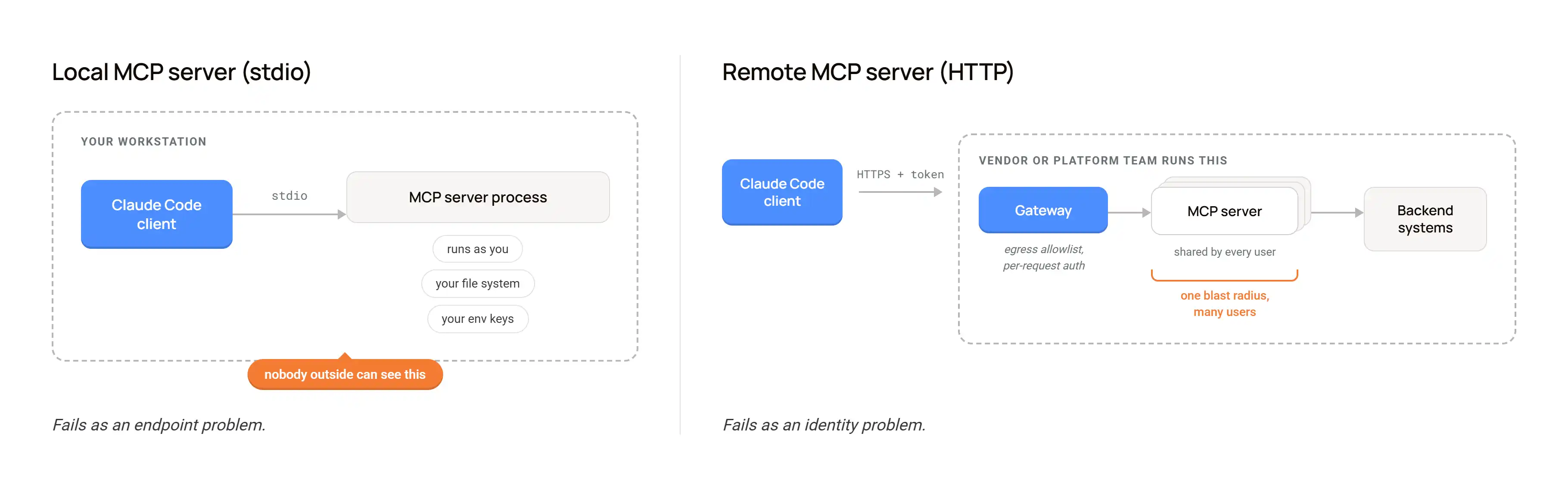
Neither shape is the safe one. Local trades network exposure for workstation exposure and invisibility. Remote trades workstation exposure for a shared blast radius and a much harder identity problem. Teams that run both, often inventory neither.
postmark-mcp: Fifteen Clean Versions, Then a Backdoor
A well-documented example of a rug pull in the MCP ecosystem is postmark-mcp, an npm package that was never an official Postmark product despite the name.
The timeline is the whole story. Fifteen releases shipped and behaved. Developers installed the package, wired it into agents that send mail, and moved on. Version 1.0.16 added a hidden BCC on outbound messages to an address on a domain the maintainer controlled. Koi Security found it, and Postmark published a statement September 25, 2025: trust built over fifteen versions, then a backdoor in the next one.
What made this work was not sophistication. The package had a version history, real users, and a plausible name. The MCP rug pull happened at the moment least likely to be re-checked, the moment after review.
Suppose you had put OAuth in front of this package or run it inside a sandboxed host. You would still have passed every connection-time check. The compromise happened in what the tool did, fifteen versions after anyone last had a reason to look closely. Any install decision you make once and never revisit is a decision a future maintainer gets to change on your behalf.
The 9.6 RCE That Sat on the Local-to-Remote Seam
CVE-2025-6514 carries a CVSS score of 9.6, near the top of the scale. JFrog reported it on July 9, 2025; where it lived matters more than the number.
It was not in the MCP specification and not in an official SDK. It was in mcp-remote, the npm proxy developers use to bridge a local stdio client to a remote server, affecting versions 0.0.5 through 0.1.15 and fixed in 0.1.16. The mechanism is short: a malicious remote server returns a crafted authorization_endpoint, the proxy opens that URL, and on Windows that runs arbitrary commands on your machine, while on macOS and Linux it can still launch arbitrary binaries.

- The connection was legitimate. The proxy carrying it was not. CVE-2025-6514 sat in mcp-remote, the bridge between a local client and a remote server.
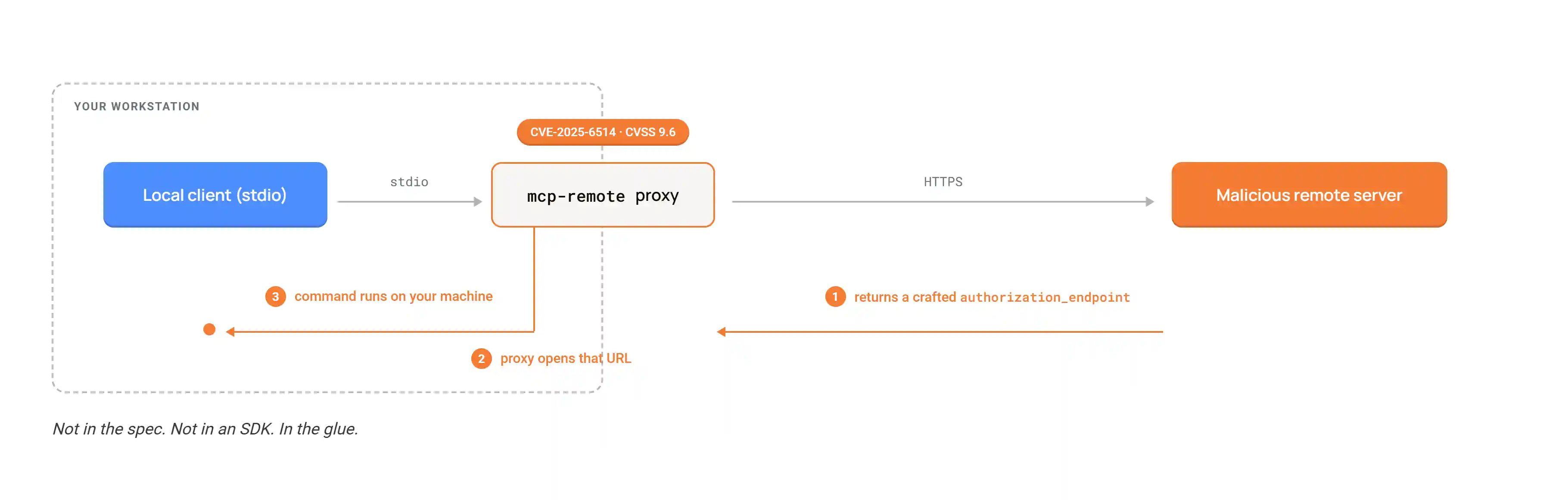
The bug sat in the glue between client and server; exactly the seam a threat model built around one deployment shape never inspects. The connection was legitimate, but the proxy carrying it was not.
Official reference servers ship flaws too: CVE-2025-68145, a path traversal in mcp-server-git, scored 6.4 on its own, and press coverage reported researchers chaining it with sibling flaws in the same server to reach code execution. Track the versions of your MCP plumbing the way you track application dependencies.
24,008 Secrets Were Sitting in Public MCP Config Files
GitGuardian’s State of Secrets Sprawl 2026, published on March 17, 2026, found 24,008 unique secrets in MCP-related configuration files on public GitHub: 2,117 of them were valid at the time of detection, 8.8% of the MCP-related findings. Live credentials an attacker could have used immediately, not artifacts of rotated or dead keys.
The mechanism is dull, which is why it keeps happening. You configure an MCP server by putting its API key straight into a local config file. That file lives inside a project directory; the project directory becomes a repository; the repository goes public, and the key travels with it. OWASP ranks token mismanagement and secret exposure at MCP01, the top entry of its beta MCP Top 10, for exactly this reason.
This category has nothing to do with whether the server is trustworthy. A well-audited, benign MCP server leaks a credential just as fast when the config holding its key gets committed. And the secret is rarely scoped only to the tool: GitGuardian’s breakdown of the valid credentials includes Google API keys and PostgreSQL connection strings, which are cloud and database access. Your secrets scanning almost certainly covers source code. Check whether it covers config files and dotfiles repos.
The Spec Went Stateless, and the 2025 Threat Model Went With It
On July 28, 2026 the MCP maintainers shipped what they describe as the largest revision of the protocol since launch, and many published MCP threat models still describe the version before it.
What the changelog actually changes:
- The
initializeandnotifications/initializedhandshake is gone. Every request carries its protocol version and client capabilities in_meta(SEP-2575). - Protocol-level sessions are gone, including the
Mcp-Session-Idheader on the Streamable HTTP transport (SEP-2567). - State that has to survive across calls, travels as server-minted handles, passed as ordinary tool arguments (SEP-2567).
- Streamable HTTP POST requests carry
Mcp-Methodon every request, andMcp-Nameon requests naming a tool, resource or prompt (SEP-2243). - List results become cacheable, carrying
ttlMsandcacheScopeontools/listand the other list and read results (SEP-2549). - Roots, sampling and logging move to deprecated under a new lifecycle policy, earliest removal on the first revision on or after 28 July 2027 (SEP-2577, SEP-2596).
Removing sessions removes a place to hang state. Authorization on every HTTP request was already the rule in the 2025-11-25 revision. What changed is that the protocol no longer offers a session to lean on. So, any implementation that keyed its checks to a session id has nothing left to key them to, and any request can land on any server instance. A threat model that assumed a session was established once, checked once, and trusted thereafter is describing a protocol that no longer exists.
The sharpest new item comes from the spec’s own security guidance, which names state-handle hijacking directly. A server must not treat possession of a server-minted handle as proof of identity and has to bind every handle to the verified user.

- The 2026-07-28 revision removed sessions. Authorization now has to travel with every request, and the handle that replaces the session rides in the model’s context.
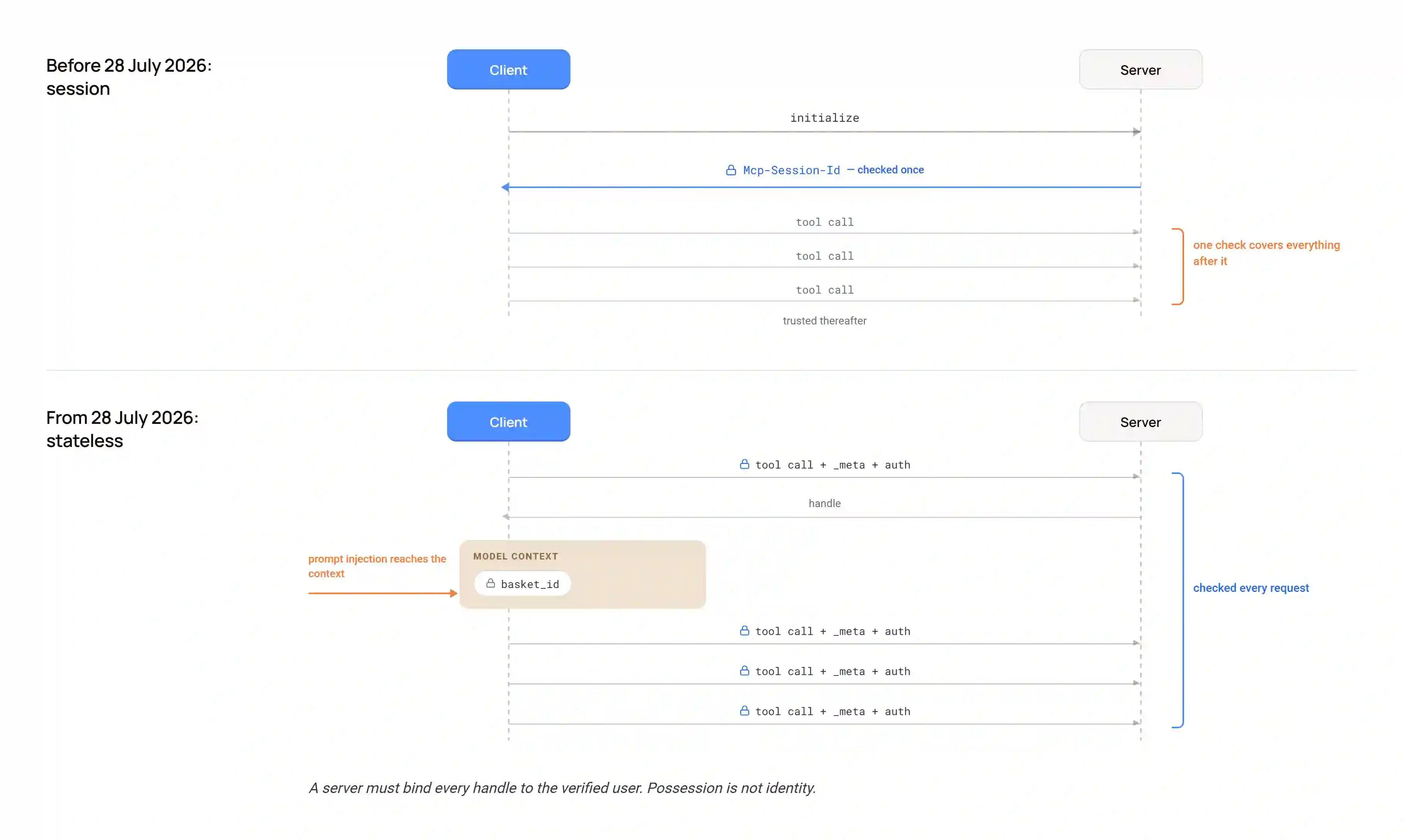
The same revision gives defenders something back. Because Mcp-Method and Mcp-Name now ride in headers, a gateway rate limiter or web application firewall can route, meter, and enforce policy on MCP traffic without parsing the JSON body. Policy moves off your laptop and onto the network. This applies to Streamable HTTP. A local stdio server has no such headers, which is one more reason the local shape needs host controls. Route and rate-limit on the header, then verify the body matches it before you act on either.
The revision changes less about authorization than the coverage around it suggests. Authorization servers should include the iss parameter per RFC 9207, and clients must validate it, when present, before redeeming an authorization code (SEP-2468). Clients key stored credentials by issuer identifier and re-register when the authorization server changes (SEP-2352). Dynamic client registration is deprecated in favour of Client ID Metadata Documents (PR #2858), and clients declare an application_type while it survives (SEP-837). Refresh tokens, scopes, and discovery are not in this changelog at all.
Both eras run at once, and no negotiation handshake smooths that over. The versioning page splits implementations into Modern, Legacy and Dual-era. A server that cannot serve the version a client asked for returns UnsupportedProtocolVersionError listing what it does support, and the client retries with a version they share. A dual-era server can serve a legacy client through the old initialize path, while a modern client talking to a legacy-only server simply fails. Assume a meaningful share of production deployments have not moved yet.
What This Looks Like in Claude Code
Claude Code makes the local-versus-remote choice concrete. It offers both paths and three storage scopes.
The local path. claude mcp add --transport stdio <name> -- <command> starts a process on your machine. Environment variables, which in practice means API keys, go in --env or in the env block of a config file, and which file depends on the scope. The default local scope writes to ~/<project>/.claude.json under the current project. project scope writes .mcp.json at the repository root, and everyone who clones the repo inherits it. user scope writes to the top level of ~/.claude.json and follows you into every project. The middle one deserves the most attention, because .mcp.json is a file your team ships, and it is the same kind of file the GitGuardian number is about.
Claude Code has a control here, and the control has an edge. In an interactive session, it asks for approval before it uses a project-scoped server from .mcp.json; a repository you clone cannot launch processes on your machine without your consent. In claude -p, in the Agent SDK and in cloud runs, it cannot prompt, so it loads those servers without asking. The documented mitigation for headless runs is --strict-mcp-config with a reviewed --mcp-config file, or excluding project settings with --setting-sources; a CI job only ever loads servers you chose. Your terminal and your CI job read the same file and apply different trust rules. .mcp.json also expands ${VAR}, which keeps a key out of the file and inherits whatever the environment holds. claude mcp reset-project-choices clears the approvals for review.
The remote path. claude mcp add --transport http <name> <url> points at a hosted endpoint you do not run. When a server answers 401 or 403, Claude Code flags it as needing auth, and /mcp or claude mcp login <name> runs the OAuth flow. Tokens land in the OS keychain or a credentials file with 0600 permissions rather than in config, which beats a bearer token pasted into JSON. A pasted bearer token still works, though, and that is the shape worth questioning: one long-lived key, in client config, scoped to whatever the vendor’s default happens to be. Ask what that key can reach, and what happens when the repository beside it goes public.
The local path asks what a process running as you can touch. The remote path asks what one credential may do and who else holds one like it. Runtimes that load tools as installable skills rather than over MCP are a third shape with a threat model of their own. Decide on purpose rather than by whichever option the setup flow offers first.
Beyond Connection Auth: What to Actually Check
Five checks, drawn from the failure modes above and the plumbing bug between them.
1. Re-review on update, not only on install. Pin the version of every MCP server you depend on, and diff tool definitions between versions the way you would diff a dependency’s changelog. A remote server can also change what tools/list returns without any package bump, so hash the tool definitions you approved and re-approve when the hash changes. A hash catches a changed definition, not a changed implementation behind an unchanged one, so for anything with write or execute reach, review the code or run it where its effects are contained. A server that passed review once can change later, and the change is the attack.
2. Treat a declared capability as a claim to verify. Tag every tool by what it can actually do, Read, Write, Execute, Egress, then compare that against what it says it does. A tool that calls itself read-only and turns out to write, or a tool that has no reason to leave the machine and opens outbound connections, is a mismatch worth flagging before anyone proves it malicious. Good MCP server design helps you here. A server that puts its real contract in inputSchema and outputSchema, rather than burying it in a description string, is a server whose data shape you can actually review. Schemas do not tell you side effects or effective permissions, so review those separately.
3. Scan config files, not only source code. Point your secrets scanning at .mcp.json, claude_desktop_config.json, and the dotfiles repo you forgot you made public. Do it before the file leaves your machine, because rotation after the fact is a race you start behind.
4. Know which spec revision and which plumbing versions you run. An unpatched proxy or an unupgraded revision is a fact about your exposure. Modern, Legacy or Dual-era is a security property, not a compatibility footnote.
5. Ask what a tool call can reach, not only who can call it. Connection auth answers who. Everything above answers what.
For a neutral checklist to hold yours against, the NSA published one. Its cybersecurity information sheet Model Context Protocol (MCP): Security Design Considerations for AI-Driven Automation, dated 20 May 2026, carries nine recommendations and ranks none of them. The first five: choose supported MCP projects, design for boundaries, validate parameters, constrain and sandbox tool execution, sign and verify MCP messages.
What Your AI Security Engineer Sees in Your MCP Servers
Everything above shares one shape. A check that ran once stops being true, and nothing tells you when. That is the gap Trent, your AI Security Engineer, is built to close. An experienced security engineer embedded in your team; one you can talk to, just like a security engineer at your side.
Point Trent at your codebase, one repo or a whole application, and it reconstructs your architecture from the real code. It inventories every agent, tool, skill and MCP server, tagging each by what it can actually do: Read, Write, Execute, Egress. It draws the capability graph, every agent, the tools it calls, the dependencies those reach, so you can see which paths combine untrusted input with the power to act. That is your blast radius, drawn as a map, and it is where a .mcp.json entry that quietly grew write access shows up before anyone proves it malicious.
It works where you already do. Connect the Trent MCP server in your coding agent, like Claude Code, and ask it in plain language for your posture and a prioritized plan. Trent makes the fix with you, then reviews its own change to confirm it actually holds, and it flags the path again the moment a later change regresses it. A server that behaved for fifteen releases and changed in the next one is exactly the change a one-time connection check cannot see and a rescan catches. Answers, not alerts.
Reviewed by Himamsu Siriseni MTS @ Trent AI, Eno Thereska, Co-founder & CEO at Trent AI
See what your MCP servers can actually reach
Point Trent at your codebase and get the inventory, the capability graph, and the fix.
Frequently Asked Questions
Does OAuth make an MCP server secure?
No. OAuth grants a caller scoped access to a server. It does not inspect what an authorized tool call does once it runs, does not notice when a tool you already approved changes behavior in a later version, and does not protect an API key sitting in plaintext in a config file the host never reads. Treat connection auth as the floor of your MCP security work rather than the ceiling of it.
Can a trusted MCP server turn malicious later?
Yes, and it already has. The postmark-mcp npm package, which was never an official Postmark product, shipped fifteen clean versions before version 1.0.16 added a hidden BCC that exfiltrated outbound mail. Koi Security found it and Postmark confirmed it in September 2025. Install history, star counts and a clean track record tell you nothing reliable about the version you are running today.
Where do MCP servers actually leak secrets?
One documented route is local configuration files. .mcp.json, claude_desktop_config.json and their equivalents hold API keys in plaintext, then reach public repositories inside a project or a dotfiles repo. GitGuardian found 24,008 unique secrets in MCP-related config files on public GitHub in its 2026 report, and 2,117 of them still worked when found. Point your secrets scanning at config, not only at source code.
Does the 2026 MCP spec update fix these problems?
Partly. The 2026-07-28 revision removes protocol-level sessions, which forces per-request authorization, and its new routing headers let a gateway enforce policy without parsing request bodies. It also names state-handle hijacking as a risk to design against. It does nothing about tool poisoning, malicious servers or config-file secrets, and legacy deployments keep the older surface for now.
Is a local MCP server safer than a remote one?
No, they fail differently. A local server runs with your credentials and your file access on a machine few people audit, which is where shadow MCP comes from. A remote server shares one blast radius across every user and turns the problem into identity and consent: over-broad tokens, ambient authority, confused deputies. Teams that run both shapes often keep an inventory of neither.
How do I secure MCP in Claude Code?
Choose deliberately between the local stdio install and the remote HTTP connection rather than accepting whichever one the setup flow offers you first. Check the config file for plaintext secrets before anyone commits it and remember that project-scoped .mcp.json servers prompt for approval interactively but load silently under claude -p. Then confirm what the connection is scoped to reach, not only what it may connect to.